Authentication Flows
When the SAML User Authentication integration is enabled the login experience of users will change.
Changes to the Login Page
Once the SAML User Authentication configuration is complete, the Login page will offer alternative sign-in methods, including the option to sign in via the SAML Identity Provider (IdP).

Login directly from Jadu Connect
Scenario: The user is logging in after opening the Jadu Connect login page directly.
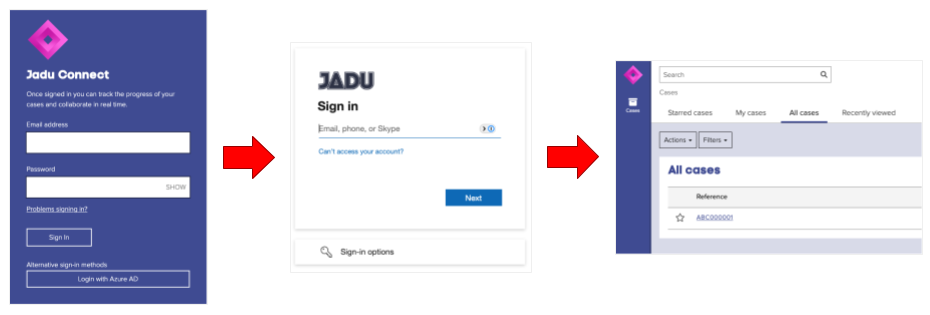
- Click the Login with... button under Alternative sign-in methods to start the SAML sign-in flow.
- Log in using SAML Identity Provider (e.g., Azure) credentials. If already logged in to the SAML Identity Provider, the user will not be prompted to log in again.
- Upon successful authentication, the user will be signed into Jadu Connect.
Login from Jadu Central (without 'Bypass Login Page' enabled)
Scenario: The user is logging into Jadu Central using the Sign in with Jadu Connect option. In the SAML User Authentication settings within Jadu Connect, the Bypass Login Page option is disabled.
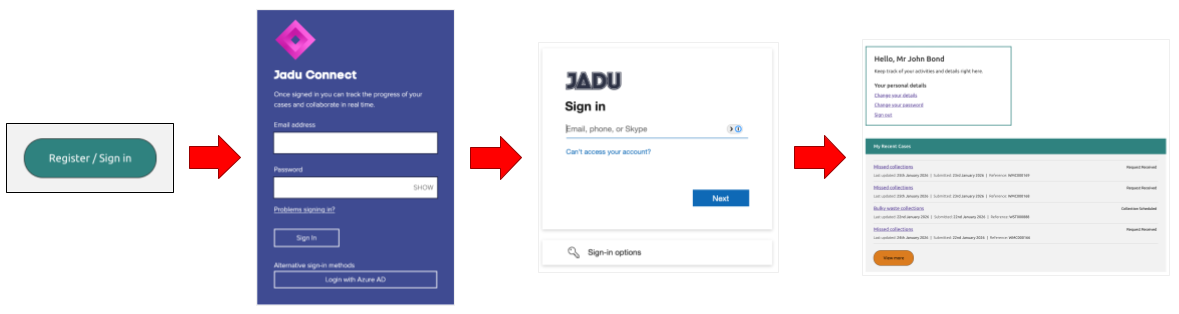
- Click the Sign in button on the Jadu Central website. This will redirect the user to Jadu Connects login page.
- Click the Login with... button under Alternative sign-in methods to start the SAML sign-in flow.
- Log in using SAML Identity Provider (e.g., Azure) credentials. If already logged in to the SAML Identity Provider, the user will not be prompted to log in again.
- Upon successful authentication, the user will be signed into Jadu Connect and automatically redirected to the Jadu Central website, where they will also be signed in.
Login from Jadu Central (with 'Bypass Login Page' enabled)
Scenario: The user is logging into Jadu Central using the Sign in with Jadu Connect option. In the SAML User Authentication settings within Jadu Connect, the Bypass Login Page option is enabled.

- Click the Sign in button on the Jadu Central website login page.
- Log in using SAML Identity Provider (e.g., Azure) credentials. If already logged in to the SAML Identity Provider, the user will not be prompted to log in again.
- Upon successful authentication, the user will be signed into Jadu Connect and automatically redirected to the Jadu Central website, where they will also be signed in.
Note: In this scenario, the user will be silently redirected through Jadu Connect's authentication pages.